- Published on
Thinking in Bytes: A Systems Programming Primer for Modern Developers
- Authors

- Name
- Siddharth Singh
Most application developers rarely need to think about bytes anymore. Post-LLM developers are even skipping the higher abstractions and go straight from Claude to Shipping.
We work with strings, JSON documents, HTTP requests, database rows, images, objects, and increasingly with code generated by an LLM. If we want to save something, we call a serialization library. If we want to read a file, we get a string back. If we want to send something across the network, a framework converts our object into JSON and the HTTP library takes care of everything below it.
That is a useful way to build software, but it also means that many of us can work for years without looking at what our data actually becomes inside a computer.
If you want to move into systems programming, storage engines, databases, networking, operating systems, compilers, or other performance-sensitive infrastructure, bytes stop being an implementation detail. They become one of the basic materials you work with.
This article is my attempt to present a practical introduction to how data becomes bytes, how those bytes are represented, stored, moved, and interpreted, and how to work with them directly in Rust. It builds the low-level intuition needed for storage engines, databases, binary formats, and other systems software. I feel that system software is difficult to understand for a typical Application developer working on React and springboot all day(replace your software). It can be made more accessible if we build a bridge and explain the foundations in a simple way before presenting the tiered compaction strategy for LSM trees.
At the end of this article, there are couple of exercies around handling bytes. The exercies challenge you to write code for most common operations involving bytes in Rust(or your faviourite language) so that you are comfortable with the abstraction and the apis.
Alright. Enough of context!
Instead of beginning with definitions, let us begin with a file.
Create a File and Look Inside It
Open PowerShell and run:
"Air" | Out-File -FilePath "test.txt" -Encoding utf8
Format-Hex -Path "test.txt"
Note: If you are on a Mac or Linux environment, you can use the hexdump command with -C flag.

Depending on which PowerShell version you are running, you may see something similar to this:
           Path: C:\Users\you\test.txt

           00 01 02 03 04 05 06 07 08 09 0A 0B 0C 0D 0E 0F

00000000   EF BB BF 41 69 72 0D 0A
You wrote one word:
Air
But your computer shows you:
EF BB BF 41 69 72 0D 0A
This is our first step down the abstraction ladder.
The file is not stored as the concept of a string called "Air". It contains a sequence of bytes that some software later interprets as text.
In this particular example, the interesting bytes are:
41 69 72
They correspond to:
A i r
The first three bytes:
EF BB BF
are the UTF-8 byte order mark that Windows PowerShell 5.1 writes when Out-File -Encoding utf8 is used. PowerShell 7 changed its defaults, so you may not see those three bytes on a newer installation.
The final bytes:
0D 0A
represent the Windows newline sequence, carriage return followed by line feed. PowerShell added it because "Air" was written as a line of text.
Already, a three-character experiment has exposed several things that normally remain hidden: text encoding, byte representation, a byte-order marker, and the operating system's convention for representing a newline.
Let's remove some of those distractions and concentrate on the characters themselves.
If your shell allows you to write UTF-8 without a BOM, create a file containing exactly:
Air
The interesting part of its hex representation will be:
41 69 72
Now we can ask the more useful question.
What exactly is 41?
41 Is Not Forty-One
When Format-Hex displays:
41
it is showing the byte in hexadecimal.
41 in hexadecimal is 65 in decimal.
And 65 is the character A in ASCII, which is also represented identically in UTF-8.
So we have several representations of the same value:
Character       A

Decimal         65

Hexadecimal     41

Binary          01000001
Nothing about the underlying value changed. We simply changed the notation we used to look at it.
The same is true for the remaining characters:
Character    Decimal    Hex       Binary

A            65         41        01000001
i            105        69        01101001
r            114        72        01110010
The file therefore contains three useful bytes:
41 69 72
which can also be written as:
01000001 01101001 01110010
The hexadecimal form is much easier for humans to work with, which is why hex dumps, debuggers, binary file specifications, network protocols, storage engines, and systems documentation commonly represent bytes using hexadecimal.
There is also a convenient mathematical reason.
One hexadecimal digit represents exactly four bits:
0 = 0000
1 = 0001
2 = 0010
3 = 0011

...

E = 1110
F = 1111
A byte has eight bits, so exactly two hexadecimal digits represent one byte.
For our A:
0x41

4        1
↓        ↓
0100     0001

01000001
Once you become comfortable reading hexadecimal, something like:
48 65 6C 6C 6F
starts looking much less mysterious.
It is simply:
Hello
encoded as bytes.
What Is a Byte?
A bit can represent two states:
0
1
A byte is conventionally eight bits:
00000000
Eight binary positions give us 256 possible combinations, from:
00000000
to:
11111111
or, in decimal:
0 ... 255
and in hexadecimal:
00 ... FF
This is why an unsigned 8-bit integer in Rust has the range:
0..=255
and why Rust calls the type:
u8
That small detail becomes useful very quickly because Rust's basic representation of raw bytes is also u8.
A collection of raw bytes therefore naturally becomes:
Vec<u8>
and a borrowed view over some bytes becomes:
&[u8]
We will return to those shortly.
Going One Level Lower: Bits
Let's take the byte representing A:
01000001
Each position represents a power of two.
Bit position:     7    6    5    4    3    2    1    0

Value:          128   64   32   16    8    4    2    1

A:                0    1    0    0    0    0    0    1
The positions containing 1 are:
64 + 1
which gives:
65
and 65 corresponds to A.
For i:
01101001
we have:
64 + 32 + 8 + 1 = 105
which is the decimal value associated with i.
You do not need to spend your working day manually converting binary to decimal, and you certainly should not memorize large binary values, but you should be comfortable enough with the representation that a byte such as:
00000101
does not look abstract.
It contains two set bits:
4 + 1 = 5
This becomes particularly important when bytes are not being used to represent text at all.
A byte might instead contain eight independent boolean flags:
00000101
where individual bits mean things such as:
bit 0 → compressed
bit 1 → encrypted
bit 2 → deleted
bit 3 → replicated
...
Now 00000101 means that bit 0 and bit 2 are enabled.
A single byte has stored eight possible boolean properties.
This kind of representation appears frequently in file formats, database records, network protocols, compression formats, hardware interfaces, and operating system structures because thinking at the byte and bit level gives us much more control over how data is represented.
But Does the Disk Literally Store Ones and Zeroes?
Not quite.
When we draw:
A

↓

0x41

↓

01000001

↓

disk
the last step is a useful abstraction, but it is not a literal description of modern hardware.
Software works with bits and bytes. Physical storage represents those bits using physical states.
On an SSD, data is stored using electrical charge states inside flash memory cells. Modern flash can store more than one bit per cell by distinguishing between several charge levels. SSD controllers add another substantial layer involving pages, erase blocks, wear levelling, error correction, logical-to-physical address translation, caches, and firmware.
A simplified path looks more like this:
"Air"

   ↓

UTF-8 encoding

   ↓

41 69 72

   ↓

01000001 01101001 01110010

   ↓

File system

   ↓

Logical storage blocks

   ↓

SSD controller

   ↓

Flash pages / erase blocks

   ↓

Physical charge states
You normally do not need to reason about the final few levels when writing software, but it is important to understand that our bits are already an abstraction over physical hardware.
For most systems programming, the byte is the useful boundary.
A File Is Just an Interpretation of Bytes
Now consider something slightly more interesting.
Imagine these bytes:
53 69 64
We could interpret them as UTF-8 and get:
Sid
But the bytes themselves do not contain the information:
"This is a UTF-8 string."
They are simply values.
Their meaning comes from the program interpreting them.
Consider:
00 00 00 2A
One program might interpret those four bytes as a big-endian 32-bit integer:
42
Another might treat them as four independent numbers:
0, 0, 0, 42
Another could interpret them as part of an image.
Another could consider them part of a compressed stream.
Another might interpret the first byte as a version number and the remaining three bytes as flags.
Bytes have representation. Formats give them meaning.
This distinction is fundamental to understanding systems software.
A PNG file is not intrinsically an image as far as the storage device is concerned. It is a sequence of bytes following a specification that PNG-aware software understands.
A SQLite database is a sequence of bytes.
A compiled executable is a sequence of bytes.
A ZIP archive is a sequence of bytes.
An MP4 video is a sequence of bytes.
A network packet carries bytes.
A database page contains bytes.
The structures we see are interpretations imposed on those bytes by software.
Look Inside More Files
You can prove this to yourself very easily.
Run:
Format-Hex some-image.png
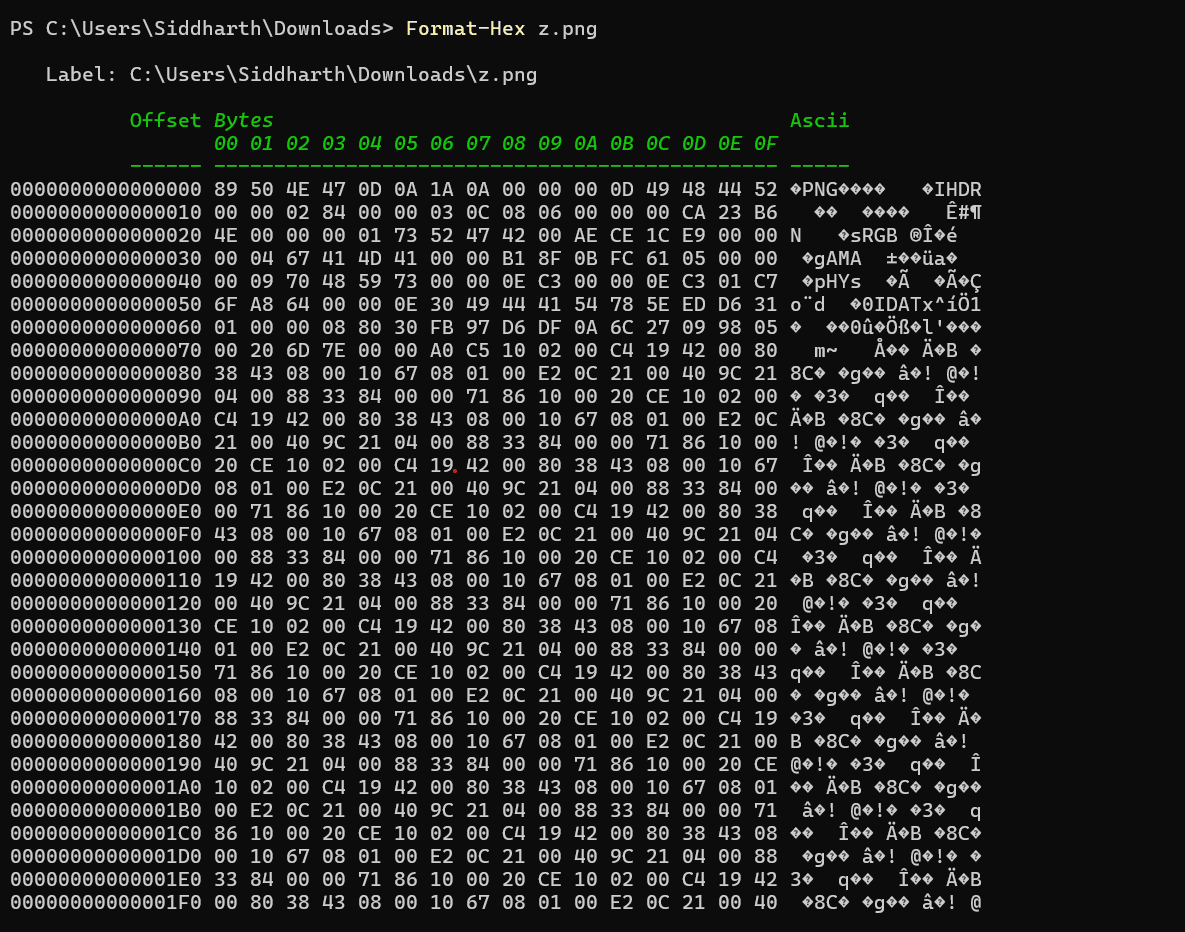
The beginning of a PNG file contains a well-known signature beginning with:
89 50 4E 47
Some of those values can even be interpreted as text:
50 4E 47

P  N  G
Do the same with a ZIP file and you will commonly encounter:
50 4B
which appears as:
PK
in ASCII.
A SQLite database begins with bytes representing:
SQLite format 3
These are examples of file signatures, sometimes called magic numbers. They allow software to look at the first few bytes of a file and determine what kind of structure is expected to follow.
The important lesson is not to memorize these values. It is to notice that what appears in your file explorer as:
photo.png
database.db
archive.zip
eventually becomes something more like:
[bytes][bytes][bytes][bytes]...
and a specification tells the program how those bytes should be understood.
Text Is Also a Binary Format
It is easy to mentally separate "text files" from "binary files", but at the storage level that distinction is misleading.
Text is also stored as bytes.
What makes it text is the encoding used to interpret those bytes.
When we wrote:
Air
we saw:
41 69 72
because ASCII characters in that range use the same byte representation in UTF-8.
Now consider a character outside basic ASCII.
For example:
é
Its Unicode code point is:
U+00E9
In UTF-8 it is represented using two bytes:
C3 A9
The character:
A
uses one UTF-8 byte:
41
while many emoji require four UTF-8 bytes.
This gives us an important relationship:
Character

    ↓

Unicode code point

    ↓

Encoding

    ↓

One or more bytes
Unicode defines characters and their code points.
UTF-8 defines how those code points are encoded into bytes.
These are related concepts, but they are not the same thing.
This matters whenever you calculate lengths.
Consider Rust:
fn main() {
    let text = "hello";

    println!("{}", text.len());
}
The result is:
5
But String::len() in Rust returns the length in bytes, not the number of human-visible characters.
Now try:
fn main() {
    let text = "नमस्ते";

    println!("bytes: {}", text.len());
    println!("chars: {}", text.chars().count());
}
Those numbers are not necessarily the same because UTF-8 uses a variable number of bytes per Unicode code point, and human-visible grapheme clusters introduce yet another layer beyond that.
This is exactly the kind of distinction that application frameworks often hide and systems code cannot afford to misunderstand.
Numbers Also Need a Byte Representation
Strings are not special.
Suppose we have:
let value: u32 = 100;
A u32 occupies four bytes.
But if we want to write those bytes into a file, we still need to decide their order.
The hexadecimal representation of 100 is:
0x00000064
One possible byte sequence is:
00 00 00 64
Another is:
64 00 00 00
Both contain the same information.
They simply use different byte orderings.
These are called big-endian and little-endian representations, and Rust makes the choice explicit.
fn main() {
    let value: u32 = 100;

    println!("{:02X?}", value.to_be_bytes());
    println!("{:02X?}", value.to_le_bytes());
}
You should get something similar to:
[00, 00, 00, 64]
[64, 00, 00, 00]
This is why a binary format cannot simply say:
Store a 32-bit integer.
A proper format needs to say something closer to:
Store an unsigned 32-bit integer in little-endian byte order.
The bytes themselves need an agreed interpretation.
We will explore endianness separately because it deserves more attention than a paragraph, but the basic lesson already matters: even a value as simple as 100 requires a representation before it can leave your program's abstractions and become persistent bytes.
Now Let's Work with Bytes in Rust
Once the mental model is clear, Rust's byte-related types become much easier to understand.
Start with a string.
fn main() {
    let text = "Air";

    let bytes = text.as_bytes();

    println!("{:?}", bytes);
}
The result is:
[65, 105, 114]
Rust displays the u8 values in decimal by default.
We can display them as hexadecimal instead:
fn main() {
    let text = "Air";

    for byte in text.as_bytes() {
        print!("{:02X} ", byte);
    }
}
Output:
41 69 72
Those are exactly the same values we observed in the file.
That connection is worth noticing.
Rust String

"Air"

        ↓ .as_bytes()

[0x41, 0x69, 0x72]

        ↓ write()

File

41 69 72
We have moved from a language-level abstraction to the representation that can be written to storage.
u8: Rust's Byte
Rust does not have a special primitive called byte.
A byte is represented using:
u8
For example:
let byte: u8 = 65;
If we interpret that value as ASCII:
fn main() {
    let byte: u8 = 65;

    println!("{}", byte as char);
}
we get:
A
A sequence of bytes can therefore be represented naturally as:
let bytes: Vec<u8> = vec![65, 105, 114];
or in hexadecimal:
let bytes: Vec<u8> = vec![0x41, 0x69, 0x72];
Those vectors contain identical values.
Vec<u8> Versus &[u8]
You will see these two types constantly in systems-oriented Rust:
Vec<u8>
and:
&[u8]
They represent related but different ideas.
Vec<u8> owns a dynamically sized collection of bytes.
let mut data = Vec::<u8>::new();

data.push(0x41);
data.push(0x69);
data.push(0x72);
The vector owns the memory and can grow.
A slice:
&[u8]
is a borrowed view over some existing bytes.
fn print_bytes(data: &[u8]) {
    for byte in data {
        print!("{:02X} ", byte);
    }
}

fn main() {
    let data = vec![0x41, 0x69, 0x72];

    print_bytes(&data);
}
This distinction matters because systems programs frequently want to examine existing data without copying it.
If a parser only needs to inspect:
100 MB
of data, creating another 100 MB copy simply to read it is usually unnecessary.
A slice lets us refer to the existing memory.
Slicing Bytes
Consider:
fn main() {
    let data = b"ABCDEFGHIJ";

    let first = &data[0..4];
    let second = &data[4..7];

    println!("{:?}", first);
    println!("{:?}", second);
}
The b prefix creates a byte string.
The data is:
41 42 43 44 45 46 47 48 49 4A
and:
&data[0..4]
creates a view over:
41 42 43 44
without creating another copy of those bytes.
Conceptually:
Original bytes

+----+----+----+----+----+----+----+----+----+----+
| A  | B  | C  | D  | E  | F  | G  | H  | I  | J  |
+----+----+----+----+----+----+----+----+----+----+
  ^                   ^
  |                   |
  +------ slice ------+
This ability to cheaply create views over byte ranges is extremely useful when parsing binary formats, database pages, network messages, or large buffers.
Building a Binary Record
We can now do something closer to systems programming.
Suppose we want to store:
name = "Sid"
age  = 35
Instead of using JSON:
{
  "name": "Sid",
  "age": 35
}
we will invent a tiny binary format:
[name length: u32]
[name bytes]
[age: u8]
The record would look like:
03 00 00 00 53 69 64 23
assuming the name length uses little-endian encoding.
Let's construct it.
fn main() {
    let name = "Sid";
    let age: u8 = 35;

    let mut record = Vec::new();

    let name_bytes = name.as_bytes();
    let name_length = name_bytes.len() as u32;

    record.extend_from_slice(&name_length.to_le_bytes());
    record.extend_from_slice(name_bytes);
    record.push(age);

    for byte in &record {
        print!("{:02X} ", byte);
    }
}
Output:
03 00 00 00 53 69 64 23
We have just designed a binary record.
Not a particularly good or sophisticated one, but a real one.
Let's break it down:
03 00 00 00 | 53 69 64 | 23
-------------+----------+---
 name length |   "Sid"  | age
The first four bytes tell us that the name occupies three bytes.
That means a reader does not need to search for a separator character or hope that the name does not contain some reserved delimiter. It reads the length, advances three bytes, and knows exactly where the age begins.
This is a very small example of data layout design.
Once you become comfortable thinking in bytes, questions such as these start appearing naturally:
Should the length use four bytes?
Could one byte be enough?
What happens when the name is longer than 255 bytes?
Should age come before the name?
Should the record have a total length at the beginning so that we can skip the whole record?
Should there be a checksum?
Should there be a version number?
Should some fields use variable-length integers?
This is how an apparently simple collection of bytes gradually becomes a file format, a network protocol, or a database record layout.
Reading the Record Back
Now let's reverse the process.
fn main() {
    let record: Vec<u8> = vec![
        0x03, 0x00, 0x00, 0x00,
        0x53, 0x69, 0x64,
        0x23,
    ];

    let length_bytes: [u8; 4] = record[0..4]
        .try_into()
        .unwrap();

    let name_length =
        u32::from_le_bytes(length_bytes) as usize;

    let name_start = 4;
    let name_end = name_start + name_length;

    let name =
        std::str::from_utf8(&record[name_start..name_end])
            .unwrap();

    let age = record[name_end];

    println!("name = {name}");
    println!("age = {age}");
}
The reader knows nothing about a Rust User struct.
It understands a byte layout.
offset 0..4     name length
offset 4..7     UTF-8 name
offset 7        age
That distinction becomes extremely important in persistent systems because your Rust structures may change when your code changes, while data stored on disk may need to remain readable for years.
Your file format is a contract.
Your in-memory structures are implementation details.
Copying Bytes Versus Borrowing Bytes
One of the most common performance questions in systems software is surprisingly simple:
Do we need to copy these bytes?
Consider:
let data = vec![1, 2, 3, 4, 5];

let copy = data[1..4].to_vec();
copy creates new storage and copies:
2 3 4
into it.
But:
let view = &data[1..4];
does not copy the three bytes.
It creates a slice referring to the original memory.
Conceptually:
COPY

Original
[1][2][3][4][5]

       ↓ copy

New allocation
[2][3][4]
versus:
BORROW

Original
[1][2][3][4][5]
    ^--------^
        view
For three bytes, the difference is irrelevant.
For a few kilobytes repeated millions of times, or buffers measured in megabytes and gigabytes, it can become very relevant.
This is one reason Rust's ownership and borrowing model fits naturally with systems programming. The language forces you to be explicit about who owns memory and who is merely viewing it, which makes data movement much harder to ignore accidentally.
Reading Bytes as a Stream
Another important idea is that you do not always need all bytes in memory at once.
Suppose you have a 20 GB file.
This would be a poor default:
let data = std::fs::read("large-file.bin")?;
because it attempts to read the entire file into memory.
Instead, we can process bytes incrementally.
use std::fs::File;
use std::io::{self, BufReader, Read};

fn main() -> io::Result<()> {
    let file = File::open("large-file.bin")?;
    let mut reader = BufReader::new(file);

    let mut buffer = [0u8; 4096];

    loop {
        let bytes_read = reader.read(&mut buffer)?;

        if bytes_read == 0 {
            break;
        }

        let chunk = &buffer[..bytes_read];

        println!("read {} bytes", chunk.len());

        // Process chunk here.
    }

    Ok(())
}
Now our memory requirement is roughly tied to the buffer size rather than the file size.
Conceptually:
20 GB file

+---------+---------+---------+---------+---------+
| bytes   | bytes   | bytes   | bytes   | ...     |
+---------+---------+---------+---------+---------+
     ↓
  4 KB buffer
     ↓
  process
     ↓
  reuse buffer
This pattern appears everywhere: file processing, network servers, compression, database scans, log ingestion, and parsers.
Once again, the interesting question becomes not only what data do I have? but how are the bytes moving through my program?
The Hardware Has Its Own Granularity
There is one final idea worth introducing before we stop.
Although our program can manipulate individual bytes, the hardware beneath us frequently works with larger units.
A filesystem commonly allocates storage in blocks.
The operating system manages memory using pages.
Processors fetch memory into cache lines.
SSDs program data in pages and erase larger blocks.
The exact sizes and implementation details vary by system and device, so you should not build software around a guessed universal page size, but the underlying principle matters:
The cost of accessing one byte is often the cost of moving a much larger chunk of bytes.
This is one reason data layout matters.
Suppose the information you need is spread across many disconnected locations in memory:
Memory

[needed] ........ [needed] ........ [needed] ........ [needed]
The processor may repeatedly fetch different cache lines.
If the same data is stored together:
Memory

[needed][needed][needed][needed]
the hardware has a better chance of doing useful work with every chunk it fetches.
We will explore this properly when we discuss memory layout and cache locality, but this is the first connection between thinking in bytes and performance.
The goal is not simply to make data smaller.
The goal is to arrange data around the operations you intend to perform.
The Abstraction Ladder
We started with:
"Air"
and gradually moved downward:
Application concept
        |
        v
String: "Air"
        |
        v
Unicode characters
        |
        v
UTF-8 encoding
        |
        v
41 69 72
        |
        v
Bytes
        |
        v
01000001 01101001 01110010
        |
        v
Bits
        |
        v
Storage subsystem
        |
        v
Physical states in hardware
Most application development happens near the top of this ladder, and that is usually exactly where it should happen.
Systems programming requires you to become comfortable moving downward.
You should be able to look at:
let name = "Sid";
and understand that somewhere beneath it is:
53 69 64
You should be able to look at:
let value: u32 = 100;
and ask what byte order will be used when it is written to disk.
You should be able to look at:
let payload = buffer[start..end].to_vec();
and notice that bytes are being copied.
You should be able to look at a 10 GB file and ask whether the program really needs to load all of it into memory.
Those questions are more important than memorizing hexadecimal values or manually converting binary numbers.
Thinking in bytes means being conscious of representation, layout, and data movement.
That is the habit we are trying to build.
Small Experiments
Do these before moving to the next article.
1. Inspect a text file
Create:
Hello
and inspect it using Format-Hex.
Find the bytes representing each character.
Then change it to:
hello
and identify which byte changed.
2. Try non-ASCII text
Create files containing:
é
and:
नमस्ते
Inspect their bytes.
Then compare:
text.len()
with:
text.chars().count()
3. Inspect integer byte order
Write:
fn main() {
    let values = [1u32, 100, 256, 65536];

    for value in values {
        println!(
            "{value:<6} LE={:02X?} BE={:02X?}",
            value.to_le_bytes(),
            value.to_be_bytes()
        );
    }
}
Do not just look at the output. Try to explain why the byte positions change when the number crosses 255.
4. Inspect real file formats
Run Format-Hex against:
PNG
JPEG
ZIP
PDF
SQLite database
Look only at their first few dozen bytes.
See whether you can identify a header or recognizable text.
5. Design one binary record
Represent:
id:   u32
name: variable-length UTF-8 string
age:  u8
as bytes.
Write it to a file.
Read it back without using JSON, Serde, Protobuf, or another serialization library.
You are not trying to invent a better serialization format.
You are trying to force yourself to decide where every byte goes.
6. Store many records efficiently in Rust
Create a Student struct with name and age.
Build a Vec<Student> with 1000 students.
Choose an efficient byte layout, write the student data to a file using File and Write::write_all, and then read the file back using Read::read_exact or BufReader.
You can store the name length before each name, keep the age as a u8, and avoid any extra text formatting.
7. Read a byte stream with a buffer
Use BufReader and a small Vec<u8> buffer to read a file in chunks. For each chunk, print the number of bytes read and the first byte in hexadecimal. This shows how Rust APIs let you work with bytes without loading the whole file into memory.
Solutions in Rust
1. Inspect a text file
Create a file named hello.txt containing Hello and then run:
use std::fs;

fn main() -> std::io::Result<()> {
    let bytes = fs::read("hello.txt")?;
    for byte in bytes {
        print!("{:02X} ", byte);
    }
    println!();
    Ok(())
}
Then update the file to hello and run the same program again. The changed byte will be visible in the hex output.
2. Try non-ASCII text
Use Rust to inspect UTF-8 bytes and compare len() with chars().count():
fn main() {
    let text = "नमस्ते";
    println!("text = {text}");
    println!("bytes = {:?}", text.as_bytes());
    println!("len = {}", text.len());
    println!("chars = {}", text.chars().count());
}
The byte slice shows the UTF-8 encoding, and the counts show the difference between bytes and Unicode scalar values.
3. Inspect integer byte order
This exercise is already Rust-friendly. The program below prints both little-endian and big-endian representations:
fn main() {
    let values = [1u32, 100, 256, 65536];

    for value in values {
        println!(
            "{value:<6} LE={:02X?} BE={:02X?}",
            value.to_le_bytes(),
            value.to_be_bytes(),
        );
    }
}
Notice that when the number crosses 255, the least significant byte is no longer enough to hold the full value, so the remaining value moves into the higher-order bytes.
4. Inspect real file formats
Use a Rust program to inspect the first few bytes of any file:
use std::fs;

fn main() -> std::io::Result<()> {
    let file = "example.png";
    let bytes = fs::read(file)?;
    for byte in bytes.iter().take(16) {
        print!("{:02X} ", byte);
    }
    println!();
    Ok(())
}
Run this against example.png, example.jpg, example.zip, example.pdf, and example.db to see their signatures.
5. Design one binary record
Here is a simple Rust implementation that writes a binary record and reads it back:
use std::fs::File;
use std::io::{Read, Write};

fn main() -> std::io::Result<()> {
    let name = "Sid";
    let age: u8 = 35;
    let mut record = Vec::new();

    let name_bytes = name.as_bytes();
    let name_length = name_bytes.len() as u32;
    record.extend_from_slice(&name_length.to_le_bytes());
    record.extend_from_slice(name_bytes);
    record.push(age);

    let mut file = File::create("record.bin")?;
    file.write_all(&record)?;

    let mut file = File::open("record.bin")?;
    let mut length_bytes = [0u8; 4];
    file.read_exact(&mut length_bytes)?;
    let name_length = u32::from_le_bytes(length_bytes) as usize;

    let mut name_bytes = vec![0u8; name_length];
    file.read_exact(&mut name_bytes)?;
    let name = String::from_utf8(name_bytes).unwrap();

    let mut age_byte = [0u8; 1];
    file.read_exact(&mut age_byte)?;
    let age = age_byte[0];

    println!("name = {name}");
    println!("age = {age}");

    Ok(())
}
6. Store many records efficiently in Rust
A simple efficient layout stores the name length, name bytes, and age sequentially for each student.
use std::fs::File;
use std::io::{BufReader, Read, Write};

struct Student {
    name: String,
    age: u8,
}

fn main() -> std::io::Result<()> {
    let students: Vec<Student> = (0..1000)
        .map(|i| Student {
            name: format!("Student {i}"),
            age: (18 + (i % 50)) as u8,
        })
        .collect();

    let mut file = File::create("students.bin")?;
    for student in &students {
        let name_bytes = student.name.as_bytes();
        let name_length = name_bytes.len() as u32;
        file.write_all(&name_length.to_le_bytes())?;
        file.write_all(name_bytes)?;
        file.write_all(&[student.age])?;
    }

    let file = File::open("students.bin")?;
    let mut reader = BufReader::new(file);
    let mut students_read = Vec::new();

    loop {
        let mut len_buf = [0u8; 4];
        if reader.read_exact(&mut len_buf).is_err() {
            break;
        }
        let name_length = u32::from_le_bytes(len_buf) as usize;

        let mut name_bytes = vec![0u8; name_length];
        reader.read_exact(&mut name_bytes)?;
        let name = String::from_utf8(name_bytes).unwrap();

        let mut age_buf = [0u8; 1];
        reader.read_exact(&mut age_buf)?;
        let age = age_buf[0];

        students_read.push(Student { name, age });
    }

    println!("read {} students", students_read.len());
    println!("first student = {} ({})", students_read[0].name, students_read[0].age);
    Ok(())
}
7. Read a byte stream with a buffer
A buffered chunk reader is easy in Rust:
use std::fs::File;
use std::io::{BufReader, Read};

fn main() -> std::io::Result<()> {
    let file = File::open("students.bin")?;
    let mut reader = BufReader::new(file);
    let mut buffer = [0u8; 16];

    loop {
        let bytes_read = reader.read(&mut buffer)?;
        if bytes_read == 0 {
            break;
        }

        println!("read {} bytes, first = {:02X}", bytes_read, buffer[0]);
    }

    Ok(())
}
This example reads the file in small chunks while keeping the memory footprint low.
Some more interesting Problems
Exercise 1: Give Your File a Magic Number
Many binary file formats begin with a small sequence of bytes that identifies what kind of file it is. PNG, ZIP, SQLite, and many executable formats all do some version of this.
Your task is to invent a tiny file format of your own.
The first four bytes of every valid file should be:
b"MYDB"
After those four bytes, write any payload you want. For example, you could store:
MYDBhello
or some arbitrary binary values.
Then write a second program, or a separate function in the same program, that opens the file and checks the first four bytes before reading anything else.
If the first four bytes are:
4D 59 44 42
the file is valid.
If they are anything else, print something like:
Invalid file format
Try deliberately changing the first byte of the file with a hex editor or by writing a different header, then confirm that your reader rejects it.
Why this is useful
A file extension such as .db is only a filename convention. The contents of the file are what actually tell your program what it is dealing with.
This is why many formats store identifying bytes inside the file itself.
Hints
A byte string literal in Rust can be written as:
b"MYDB"
You can write the complete file with:
std::fs::write(...)
and read it back with:
std::fs::read(...)
Once you have the file contents as a Vec<u8>, compare only the first four bytes.
Think about what should happen if the file contains fewer than four bytes.
Exercise 2: Add a Version to Your File Format
Your MYDB file format works, but now imagine that you have already distributed your program and users have created thousands of files with it.
A month later, you want to change the format.
You now have a compatibility problem.
Modify your file format so that the first five bytes have the following structure:
+----------------------+---------+
| Magic Number         | Version |
+----------------------+---------+
| M    Y    D    B     |   01    |
+----------------------+---------+
  4 bytes                 1 byte
Everything after byte 5 is the payload.
Create a version 1 file such as:
4D 59 44 42 01 ...
Your reader should now perform two checks.
First, verify that the magic number is MYDB.
Then read the version byte.
If the version is 1, continue reading the file.
If it is anything else, return or print an error such as:
Unsupported MYDB version: 2
Once this works, manually create a file with version 2 and confirm that your version 1 reader refuses to process it.
Why this is useful
Persistent data usually lives longer than the code that originally created it.
A version field gives future versions of your program a way to decide how old data should be interpreted.
You have now implemented one of the most basic ideas behind evolving binary formats.
Hints
The version does not need to be a string.
One byte is enough:
let version: u8 = 1;
You can build the file contents incrementally:
let mut data = Vec::new();
Then append:
magic
version
payload
Think carefully about offsets.
If the magic number occupies bytes 0..4, where does the version live?
Where does the payload begin?
Exercise 3: Find a Byte Pattern Without Creating a String
Imagine you are scanning a large binary file and want to know whether it contains the byte sequence:
b"ABC"
The data might look like:
10 20 41 42 43 90 FF
Your task is to write a function with roughly this shape:
fn contains_pattern(data: &[u8], pattern: &[u8]) -> bool
It should return true if pattern appears anywhere inside data.
For example:
let data = b"XYZABC123";

assert!(contains_pattern(data, b"ABC"));
assert!(!contains_pattern(data, b"DEF"));
Do not convert the byte slice into a String.
Work directly with bytes.
Once the basic version works, try a few less obvious cases:
data = "AAAAA"
pattern = "AAA"

data = "AB"
pattern = "ABC"

data = ""
pattern = "ABC"

data = "ABC"
pattern = "ABC"
Why this is useful
Systems software frequently searches buffers that are not text at all.
A network packet, compressed file, database page, or executable may contain arbitrary bytes, so converting everything to UTF-8 text is unnecessary and sometimes invalid.
This exercise forces you to work with the actual representation rather than introducing a higher-level abstraction you do not need.
Hints
A very simple solution does not require a sophisticated search algorithm.
Ask yourself:
If the pattern has three bytes, how many consecutive bytes of
datashould I compare at a time?
Rust slices have a method that may help:
windows(...)
Try printing:
for window in data.windows(3) {
    println!("{window:?}");
}
before writing the final solution.
For an extra challenge, implement it again without using windows().
Exercise 4: Count a Large File Without Loading It Into Memory
Suppose someone gives you a 20 GB log file and asks:
How many bytes does this file contain?
You could write:
let data = std::fs::read("large.log")?;
println!("{}", data.len());
but that attempts to load the entire file into memory.
Instead, write a small streaming program.
Open a file using BufReader, create a buffer of only 16 bytes, and repeatedly read into that same buffer until the end of the file.
For every read, add the number of bytes actually returned to a running total.
For example, imagine your file contains 40 bytes.
With a 16-byte buffer, the reads might look like:
Read 1: 16 bytes
Read 2: 16 bytes
Read 3:  8 bytes
Read 4:  0 bytes
Your final answer should be:
Total bytes: 40
Print each read as it happens so you can see that the same small buffer is being reused.
Then try the program with files of different sizes:
5 bytes
16 bytes
17 bytes
32 bytes
100 bytes
Notice what happens at buffer boundaries.
Why this is useful
Streaming is one of the most important patterns in systems software.
The size of the input does not have to determine the amount of memory your program consumes.
Databases, compression tools, network servers, file processors, and log pipelines constantly process data this way.
Hints
Start with:
use std::io::{BufReader, Read};
Your buffer can be:
let mut buffer = [0u8; 16];
Then repeatedly call:
reader.read(&mut buffer)?
read() does not promise to fill the entire buffer. It returns the number of bytes actually read.
The important value is therefore not:
buffer.len()
but the return value from read().
When read() returns 0, you have reached the end of the stream.
Exercise 5: Pack Three Booleans Into One Byte
Suppose you are designing a record format and each record has three properties:
compressed
encrypted
deleted
The straightforward representation might use three separate boolean values.
But at the binary format level, you can store all three inside a single byte.
Assign the bits like this:
Bit 0 -> compressed
Bit 1 -> encrypted
Bit 2 -> deleted
The byte can be visualized as:
bit:     7 6 5 4 3 2 1 0
         ----------------
meaning: . . . . . D E C
Now suppose a record is compressed and deleted, but not encrypted.
Your flags should become:
00000101
because:
compressed = 1
encrypted  = 0
deleted    = 1
Write Rust code that starts with:
let mut flags: u8 = 0;
and sets the appropriate bits.
Then write code that reads the same byte and reconstructs the three boolean values.
Your output might look like:
flags      = 00000101
compressed = true
encrypted  = false
deleted    = true
Try every combination of the three flags.
There are only eight possible combinations.
Why this is useful
A byte gives you eight independent bits, and binary formats often use those bits to store compact flags instead of dedicating an entire byte or integer to every yes/no property.
You will see this idea in file formats, network protocols, database records, CPU instructions, permissions, and operating system APIs.
Hints
Each flag can be represented using a bit mask:
0b0000_0001
0b0000_0010
0b0000_0100
To set a bit, look at the bitwise OR operator:
|
To test whether a bit is set, look at the bitwise AND operator:
&
For example, think about what this expression tells you:
flags & 0b0000_0100
For an extra challenge, add a fourth flag called replicated without changing the size of the record.
Where We Go Next
I left a few important questions unanswered on purpose, because they are better explored after you have a solid mental model of bytes and representation.
What does a Rust struct actually look like in memory?
Why can a struct containing nine bytes of fields occupy sixteen bytes?
What is alignment?
Why does field ordering sometimes affect memory consumption?
Why can scanning an array be dramatically faster than walking a linked structure even when both contain exactly the same information?
Those questions take us from what bytes are to how bytes are arranged in memory.